

Nested filters for dynamic groups in Entra ID
The latest features in DynamicSync provide a wider range of filter attributes to accurately filter Entra ID group members. Based on attribute values, DynamicSync generates the correct synchronization of all members into the desired group.
While only a handful of linear filters are possible in Entra ID, DynamicSync offers nested filters for dynamic groups. This not only allows up to 50 filter options, but also nesting of these. In addition, an improved member preview provides an overview of all members. The following article summarizes the most important updates.
Index
Nested filters for dynamic groups in Entra ID
Nested filters are now included in the latest update of DynamicSync. These advanced filtering options allow members of a source group to be precisely assigned to a target group through multiple nested filters.
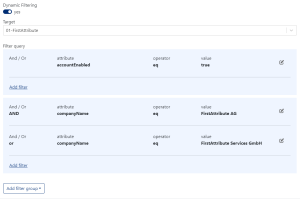
In our example, a use case represents how nested filters work. A dynamic filter is enabled that filters out the following members:
- Attribute “accountEnabled” equals “true”
- AND attribute “companyName” equals “FirstAttribute AG”
- OR attribute “companyName” equals “FirstAttribute Services GmbH”
The nested filter pulls all users in Entra ID that match the attribute values into a common target group. With Entra’s on-board tools, there is a maximum of 5 filters that can be added linearly. DynamicSync, on the other hand, allows up to 50 filter queries.
More attributes for dynamic filters
DynamicSync now provides extended dynamic filters to filter members into a new group depending on attributes. All standard attributes including extension attributes are now selectable. This gives administrators more options when creating filter queries.
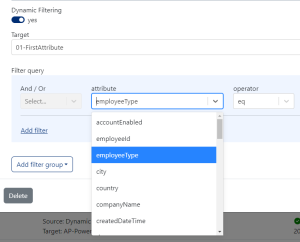
In total, the drop-down list in DynamicSync now shows 41 attributes.
This list can also be individually expanded with standard attributes and schema-extended attributes as of November 2023.
Show all Entra ID group members in preview
The include and exclude lists in DynamicSync allow you to select members to be added or removed from a group.
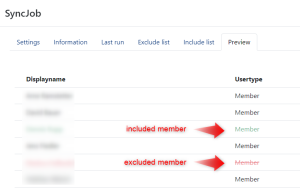
In the member preview you can see all members of the group. This makes it easy to check whether the filter rules are being applied correctly. The added and removed members are highlighted by color. Excluded members are crossed out and included members are highlighted in green.
In Entra ID it is not possible to preview all group members.
Dynamic Groups in Entra ID – Find out more now
 DynamicSync is a cloud group automation software from FirstAttribute AG. As a pure cloud service (SaaS), DynamicSync specializes in
dynamic and automatic group synchronizations in Entra ID.
In addition to a online demo, our team is also available by phone. Take advantage of our experience and call us at
+49 8196 998 4330.
About First Attribute
FirstAttribute AG is an independent, German cloud service and software company with a focus on Identity & Access Management (IAM) for AD and M365.
Since its foundation in 2001, FirstAttribute has successfully supported many well-known medium-sized and large companies in Germany and internationally.
Contact us for questions about dynamic groups in AD and AAD, as well as questions about Identity & Authorization Management and M365/Microsoft Teams.